
Friends Kingdom

[iPad] Review: iBank for iPad a stellar full-featured personal financial app


A good banking app suggestion always comes up.  Maybe this is the solution. 

http://www.macworld.com/article/2042830/review-ibank-for-ipad-a-stellar-full-featured-personal-financial-app.html


~KLM
\\ "If people are not laughing at your goals, your goals are too small..." ~Azim Premji //


  • iBank for iPad
     $15.00

    For tracking your personal finances on your iPad, iBank for iPad is as good—and possibly better—than any other app or online service out there.

    GET IT FOR $15.00

Jeffery Battersby@reyespoint
  • Jun 25, 2013 4:00 AM
  • print
iBank for iPad's summary home screen.

In the world of personal financial applications, if you're not using a Web-based application, then the desktop is king. Whether you're using the age-old (and aging) Quicken, or one of the many other applications that have attempted to fill gaps left by Quicken, you've usually been anchored to a desktop application. With the recent release of iBank for iPad, a desktop app may no longer be a necessity.

The problem with most iOS-based financial apps is that they can't really stand alone. They either aggregate Web-based information, offering few options for editing or manually entering that data, or they work as display tools for information you're tracking via a desktop app. iBank for iPad used to be that type of application, requiring iBank for the Macto be truly useful, but that's no longer the case. While iBank for Mac is a great addition to iBank for iPad, iBank for iPad can now handle all your budgeting, banking, and investment needs on its own.

iBank for iPad uses "Books" as a metaphor for collections of accounts. When you open the app, you are given the option of either creating a Book that syncs with the iBank for Mac app or creating a stand-alone Book. With a stand-alone Book, you can opt to enter all of your transactions by hand or you can download all your financial data via the subscription-based Direct Access. It's this last option that makes iBank for iPad shine. Direct Access, a feature developed by IGG Software, allows iBank to automatically connect to and download transactions from all of your financial-service companies.
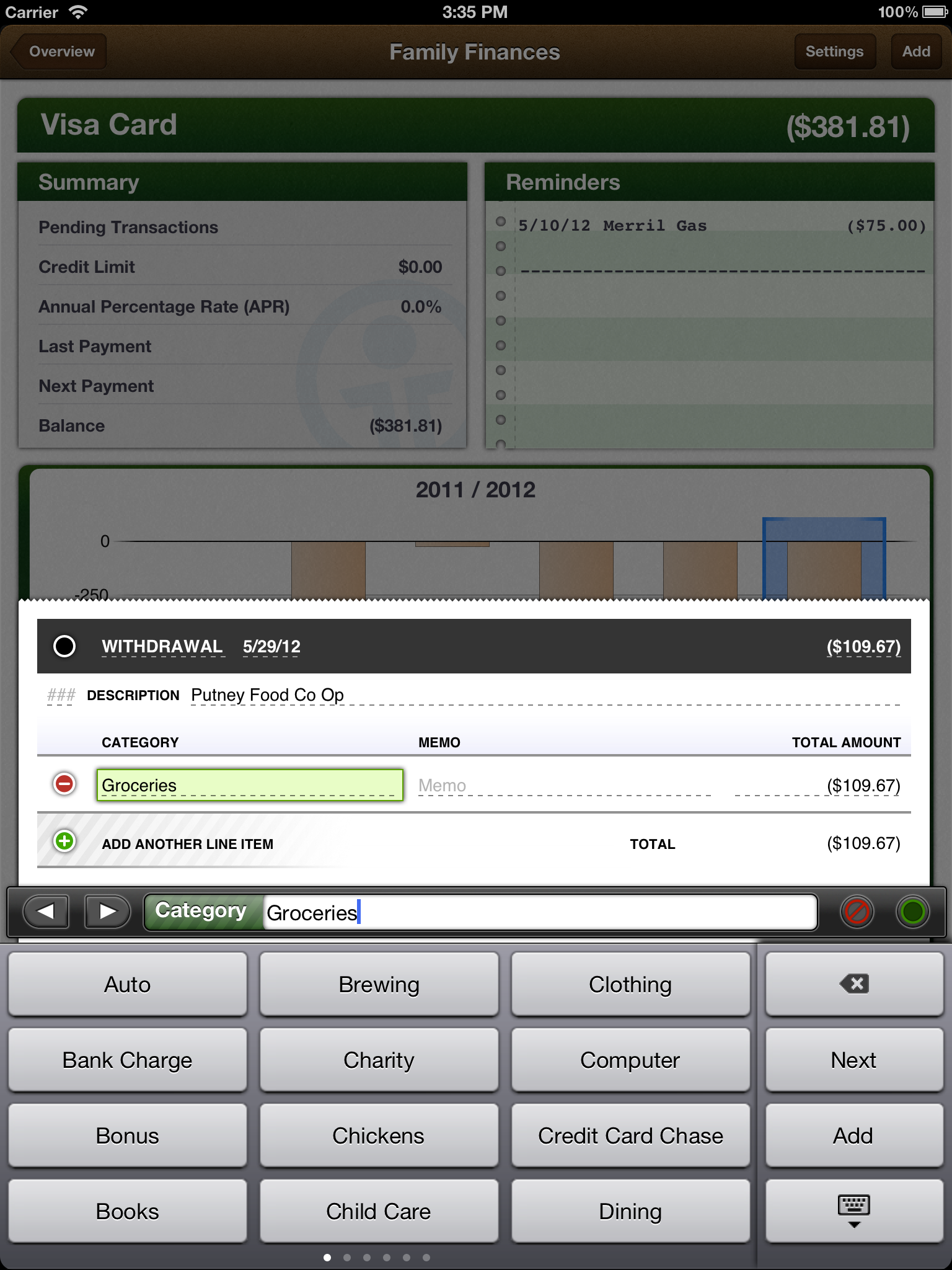
Transaction editor.

To my surprise and pleasure, iBank's Direct Access service is not limited to a selection of well-known banks, which has been the case with every other service of that type that I've tried. Not only can you connect to and download transactions from such banks as Wells Fargo and Chase, but you can also connect to obscure banks such as the teacher's credit union my wife belongs to.

Whether you download the transactions directly or enter them yourself, editing and categorizing your transactions is a snap. Double-tapping any transaction reveals a small menu offering options to edit, categorize, or delete a transaction. In practice, though, I found that when I used Direct Access, I didn't need to use the tools—iBank for iPad almost always categorized my transactions correctly.

iBank for iPad offers a very effective budgeting tool you can use to create budgets for any of the categories you've created; you can then use those budgets to track your income and expenses. In future versions of the tool, however, I'd like to see some way to take the expense information I've already collected for a specific category and use that as a starting point for a specific budget item. So, for example, if iBank already knows that I've spent an average of $100 per month over the last three months for groceries, the budget for the groceries category should already have $100 in the budget amount field. As it is, you have to first figure out how much you've spent before you can figure out a realistic budget for a given category.
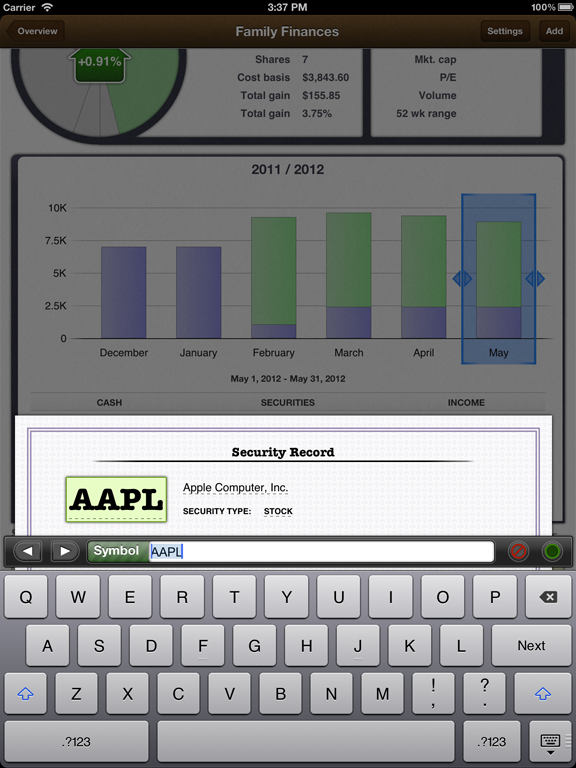
You can look up info about securities.

My only substantial complaint about iBank for iPad is that it has very limited reporting tools. Investment accounts provide some basic graphs to help you understand how your portfolio is doing, but there are no graphs for personal income and expense categories. Even more important than the lack of graphs, there is no way to print out a budget comparison or end-of-year information that you can use when preparing your taxes. These are not deal killers by any stretch, but they are features that IGG Software must add to iBank for iPad to make it the killer personal financial app it has the potential to be.

Bottom line

iBank for iPad is, in a word, stellar. If you're still using Quicken on your Mac or, for that matter, iBank for your Mac, there's no reason not to move to this app. It's as good as, or better than, anything you're using online or on your Mac.

iBank for iPad

  • GET IT FOR $15.00

At a Glance

For tracking your personal finances on your iPad, iBank for iPad is as good—and possibly better—than any other app or online service out there.

View full product specs »

Price when rated:$10 until July 15; regular price $15

__._,_.___
Reply via web post Reply to sender Reply to group Start a New Topic Messages in this topic (1)
Recent Activity:
  • New Members 3
Visit Your Group
Yahoo! Groups
Switch to: Text-Only, Daily Digest • Unsubscribe • Terms of Use • Send us Feedback
.

__,_._,___
Email ThisBlogThis!Share to XShare to FacebookShare to Pinterest
Newer Post Older Post Home

Blog Archive

  • ►  2026 (1)
    • ►  January (1)
  • ►  2025 (70)
    • ►  December (6)
    • ►  November (3)
    • ►  October (5)
    • ►  September (6)
    • ►  August (3)
    • ►  July (5)
    • ►  June (4)
    • ►  May (7)
    • ►  April (6)
    • ►  March (5)
    • ►  February (6)
    • ►  January (14)
  • ►  2024 (114)
    • ►  December (10)
    • ►  November (10)
    • ►  October (12)
    • ►  September (9)
    • ►  August (10)
    • ►  July (8)
    • ►  June (5)
    • ►  May (7)
    • ►  April (9)
    • ►  March (9)
    • ►  February (11)
    • ►  January (14)
  • ►  2023 (58)
    • ►  December (7)
    • ►  November (7)
    • ►  October (14)
    • ►  September (8)
    • ►  August (4)
    • ►  July (8)
    • ►  May (1)
    • ►  April (3)
    • ►  March (3)
    • ►  February (2)
    • ►  January (1)
  • ►  2022 (36)
    • ►  December (1)
    • ►  November (3)
    • ►  October (3)
    • ►  September (4)
    • ►  August (2)
    • ►  July (3)
    • ►  June (2)
    • ►  May (1)
    • ►  April (3)
    • ►  March (5)
    • ►  February (4)
    • ►  January (5)
  • ►  2021 (128)
    • ►  December (23)
    • ►  November (6)
    • ►  October (8)
    • ►  September (7)
    • ►  August (6)
    • ►  July (6)
    • ►  June (17)
    • ►  May (17)
    • ►  April (10)
    • ►  March (11)
    • ►  February (8)
    • ►  January (9)
  • ►  2020 (182)
    • ►  December (11)
    • ►  November (16)
    • ►  October (17)
    • ►  September (18)
    • ►  August (18)
    • ►  July (18)
    • ►  June (2)
    • ►  May (17)
    • ►  April (28)
    • ►  March (19)
    • ►  February (7)
    • ►  January (11)
  • ►  2019 (426)
    • ►  December (16)
    • ►  November (36)
    • ►  October (111)
    • ►  September (41)
    • ►  August (24)
    • ►  July (18)
    • ►  June (19)
    • ►  May (25)
    • ►  April (34)
    • ►  March (32)
    • ►  February (43)
    • ►  January (27)
  • ►  2018 (516)
    • ►  December (46)
    • ►  November (39)
    • ►  October (80)
    • ►  September (30)
    • ►  August (40)
    • ►  July (39)
    • ►  June (34)
    • ►  May (30)
    • ►  April (36)
    • ►  March (36)
    • ►  February (40)
    • ►  January (66)
  • ►  2017 (1566)
    • ►  December (71)
    • ►  November (111)
    • ►  October (228)
    • ►  September (94)
    • ►  August (63)
    • ►  July (111)
    • ►  June (259)
    • ►  May (87)
    • ►  April (91)
    • ►  March (95)
    • ►  February (124)
    • ►  January (232)
  • ►  2016 (3122)
    • ►  December (186)
    • ►  November (169)
    • ►  October (307)
    • ►  September (239)
    • ►  August (326)
    • ►  July (407)
    • ►  June (301)
    • ►  May (119)
    • ►  April (250)
    • ►  March (286)
    • ►  February (225)
    • ►  January (307)
  • ►  2015 (6367)
    • ►  December (436)
    • ►  November (497)
    • ►  October (613)
    • ►  September (599)
    • ►  August (449)
    • ►  July (474)
    • ►  June (563)
    • ►  May (730)
    • ►  April (835)
    • ►  March (250)
    • ►  February (489)
    • ►  January (432)
  • ►  2014 (6092)
    • ►  December (393)
    • ►  November (671)
    • ►  October (835)
    • ►  September (1011)
    • ►  August (440)
    • ►  July (581)
    • ►  June (346)
    • ►  May (234)
    • ►  April (328)
    • ►  March (419)
    • ►  February (319)
    • ►  January (515)
  • ▼  2013 (11151)
    • ►  December (750)
    • ►  November (528)
    • ►  October (866)
    • ►  September (1094)
    • ►  August (849)
    • ►  July (876)
    • ▼  June (1230)
      • Re: [iPad] Question about screen
      • Re: [iPad] Question about screen
      • Re: [iPad] Editorial: Can Apple survive 2013?
      • Re: [iPad] Google And Apple May Bring Us A Console...
      • Re: [iPad] Re: TV towers
      • [iPad] Question about screen
      • Phuethreey Syankk Ortu Sllue and SotOng Jeanny hav...
      • III gurlz-group III Selena Gomez in Santa Monica
      • (( F-K )) Art Of Fenghua Zhong
      • Re: [iPad] Mobile Malware
      • Re: [iPad] Mobile Malware
      • Re: [iPad] Apple v. Android: Is Samsung no longer ...
      • Re: [iPad] Editorial: Can Apple survive 2013?
      • Re: [iPad] Mobile Malware
      • Re: [iPad] Google And Apple May Bring Us A Console...
      • Re: [iPad] Re: TV towers
      • [iPad] Editorial: Can Apple survive 2013?
      • Re: [iPad] Re: TV towers
      • [iPad] Apple v. Android: Is Samsung no longer in t...
      • [iPad] Google And Apple May Bring Us A Console War...
      • Re: [iPad] Mobile Malware
      • Re: [iPad] Re: TV towers
      • Re: [iPad] Re: TV towers
      • Re: [iPad] Re: TV towers
      • Re: [iPad] Mobile Malware
      • Re: [iPad] Re: TV towers
      • Re: [iPad] Re: TV towers
      • Re: [iPad] Re: TV towers
      • Re: [iPad] Re: TV towers
      • Re: [iPad] Re: TV towers
      • Re: [iPad] TV towers / Jerry
      • Ahmed Soliman posted on your timeline
      • RE: [iPad] Re: TV towers / Jerry
      • Re: [iPad] Re: TV towers / Jerry
      • Re: [iPad] Re: TV towers
      • III gurlz-group III Bridges for Aircraft
      • (( F-K )) Dogs Dressed Like Owners Portrait
      • Re: [iPad] Re: TV towers
      • Re: [iPad] Re: TV towers
      • Re: [iPad] Re: TV towers
      • Re: [iPad] OT: google is making a game console
      • RE: [iPad] Re: TV towers / Jerry
      • Re: [iPad] Re: TV towers / Jerry
      • RE: [iPad] Re: TV towers
      • [iPad] Re: TV towers / Jerry
      • Re: [iPad] OT: google is making a game console
      • Re: [iPad] OT: google is making a game console
      • Re: [iPad] OT: google is making a game console
      • RE: [iPad] Re: TV towers
      • Re: [iPad] OT: Washington State Earthquake
      • Re: [iPad] Re: TV towers
      • Re: [iPad] Re: TV towers
      • Re: [iPad] Re: TV towers
      • RE: [iPad] Re: TV towers
      • [iPad] Re: TV towers
      • Re: [iPad] Re: TV towers
      • Re: [iPad] Re: TV towers
      • Re: [iPad] Re: TV towers
      • Re: [iPad] Re: TV towers
      • Re: [iPad] Re: TV towers
      • [iPad] OT: google is making a game console
      • Re: [iPad] Re: TV towers
      • Re: [iPad] Re: TV towers
      • RE: [iPad] Re: TV towers
      • Re: [iPad] Re: TV towers
      • Re: [iPad] TV
      • Re: [iPad] Re: TV towers
      • [iPad] TV
      • Re: [iPad] OT: Washington State Earthquake
      • Re: [iPad] Re: TV towers
      • Re: [iPad] OT: Washington State Earthquake
      • Re: [iPad] OT: Washington State Earthquake
      • Re: [iPad] OT: Washington State Earthquake
      • RE: [iPad] OT: Washington State Earthquake
      • RE: [iPad] Re: TV towers
      • Re: [iPad] Re: TV towers
      • [iPad] Top 10 Steve Jobs Quotes
      • [iPad] OT: Washington State Earthquake
      • Re: [iPad] Re: TV towers
      • Re: [iPad] Re: TV towers
      • Re: [iPad] Re: Electric and Hybrid Car vs. pure Ga...
      • Re: [iPad] Re: TV towers
      • Re: [iPad] Re: TV towers
      • RE: [iPad] Re: TV towers
      • RE: [iPad] Re: TV towers
      • Re: [iPad] Re: TV towers
      • Re: [iPad] Re: TV towers
      • Re: [iPad] Re: TV towers
      • Re: [iPad] Re: TV towers
      • RE: [iPad] Re: TV towers
      • [iPad] Re: TV towers
      • RE: [iPad] Re: TV towers
      • Re: [iPad] Re: TV towers
      • Re: [iPad] Re: TV towers
      • RE: [iPad] Re: TV towers
      • [iPad] Re: TV towers
      • Re: [iPad] Mobile Malware
      • Re: [iPad] No Connection to iTunes
      • Re: [iPad] Re: TV towers
      • [iPad] Re: TV towers
    • ►  May (1101)
    • ►  April (978)
    • ►  March (638)
    • ►  February (992)
    • ►  January (1249)
  • ►  2012 (15838)
    • ►  December (1459)
    • ►  November (1495)
    • ►  October (1422)
    • ►  September (1315)
    • ►  August (1460)
    • ►  July (1344)
    • ►  June (1371)
    • ►  May (1287)
    • ►  April (1434)
    • ►  March (1420)
    • ►  February (732)
    • ►  January (1099)
  • ►  2011 (14073)
    • ►  December (931)
    • ►  November (834)
    • ►  October (893)
    • ►  September (977)
    • ►  August (1135)
    • ►  July (1336)
    • ►  June (1116)
    • ►  May (1374)
    • ►  April (1377)
    • ►  March (1486)
    • ►  February (1150)
    • ►  January (1464)
  • ►  2010 (4688)
    • ►  December (1293)
    • ►  November (1270)
    • ►  October (1038)
    • ►  September (980)
    • ►  August (107)
Simple theme. Powered by Blogger.
